
Walton Multi-Day Arrest Reports
Walton County keeps no standing weekly or seventy-two-hour arrest log. Instead, the WCSO Inmate Inquiry lets you build the range yourself. Pick a Booking From and Booking To span. Try three days or seven days. Note the exact dates whenever you save or share results. "This week" shifts fast. A saved results URL can lock in stale filters.
A seven-day window gives a broad look at Walton County bookings. Still, the portal promises no fixed retention depth. Releases, transfers, corrections, and vendor changes can all reshape what a query returns. Historical results do appear. Longer searches sometimes work. The base search form stays more dependable than any bookmarked results screen.
Read Walton Arrest Report Results
Keep two things apart: booking history and present custody. A person can be booked into Walton County Jail and released on bond. That can happen before your search even runs. Limit the query to current custody and that arrest vanishes from the results. Widen the custody setting when you want every booking inside your chosen dates.
- Open the stable WCSO portal.
- Choose a precise three-to-seven-day booking range.
- Adjust the custody filter so released people are not unintentionally excluded.
- Add a name, subject number, or booking number when narrowing the list.
- Compare identity fields and note the booking number.
- Check the Clerk record for the later case result.
Chasing a single calendar day? Use Arrested Today. It covers today rather than the multi-day arrest record and explains why a calendar day differs from a rolling twenty-four hours.
Walton Arrest Report Fields
The results give roster fields, not a full police narrative. Booking details, custody status, and identity clues are there. An arrest affidavit, a probable-cause account, full charge history, or a final outcome lives in a separate record layer.
| Displayed item | How to read it |
|---|---|
| Name and subject number | Jail-system identifiers; confirm with more than a name. |
| In-custody marker | Status when the result is checked, not a historical sentence. |
| Scheduled release date | May be blank or revised. |
| Birth and physical fields | Useful for distinguishing similar records; source errors remain possible. |
| Multiple-bookings flag | Shows repeated jail-system records, not convictions. |
| Housing facility | The facility label attached to the result. |
| Photo | An official roster image when WCSO elects to display it. |
Booking files can hold more than a screen shows. Florida's GS2 schedule describes fuller records that may include booking cards, charges, officers, arrest time and place, probable-cause material, and release information. Ask WCSO for the file directly.
Walton Arrest Search Interface
Enter the multi-day dates and custody settings on the official WCSO search form.
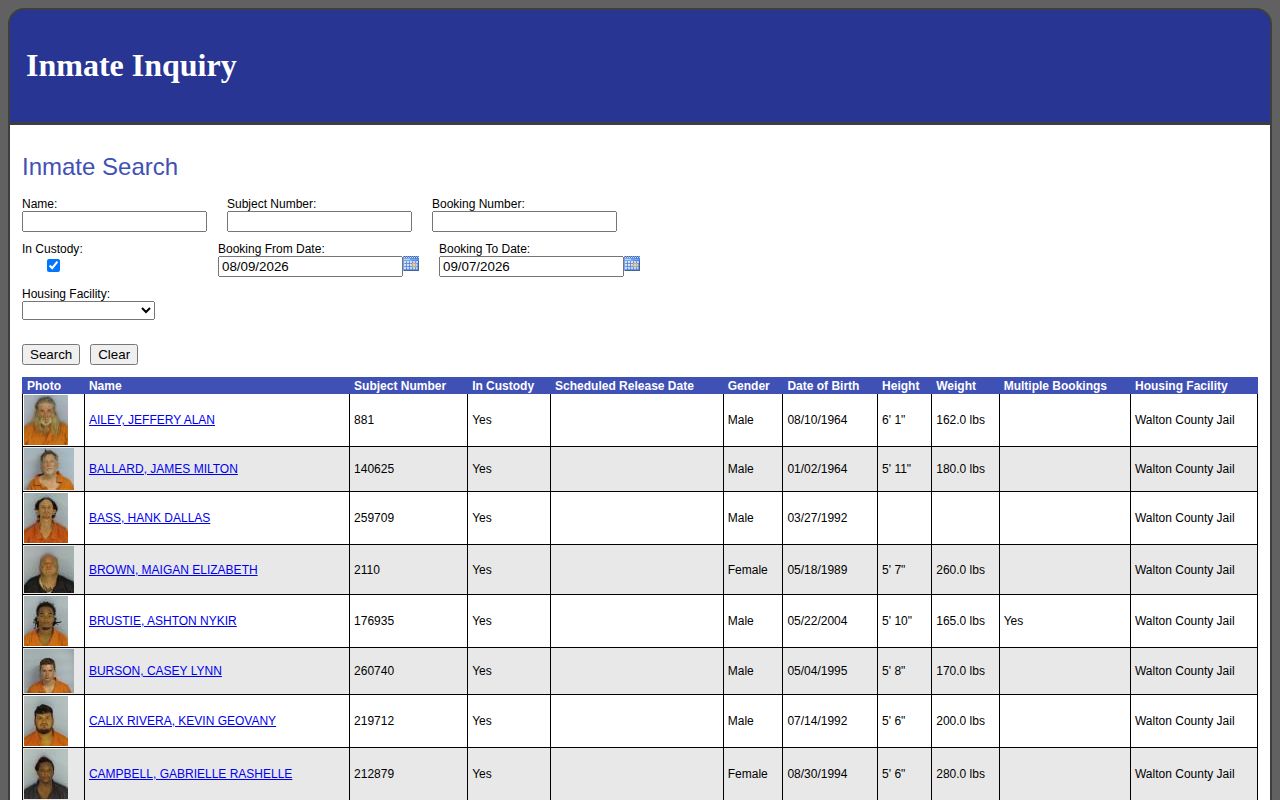
The image shows the search controls, not faces. Run a fresh query at the linked source, and turn to the Northwest Florida Daily News crime section for selective local context.

News coverage is event-driven and cannot establish that every Walton booking was reported.
Walton Weekend Arrest Patterns
The Walton County jail runs around the clock, yet WCSO posts no online update clock. Bookings take time. Fingerprints, classification, and booking photos come first. Arrest, transport, and data entry need not happen at once, so a late-Friday or holiday booking may appear online only after intake work wraps. That lag is not a backlog. It implies no county promise about timing. For weekend searches, use overlapping dates. Run the query from the day before your window through the day after it, then verify individual records. Treat the booking date as approximate unless the underlying file confirms the arrest time. Call the jail at (850) 892-8196 for urgent custody questions, and request the booking file when the timing detail itself matters.
Walton Arrest News Is Selective
News coverage of Walton County arrests is spotty by nature. WCSO's official news archive posts selected incidents. WJHG, WEAR, FOX10, and Wiregrass Daily News each report certain Walton arrests. Big cases get the ink. Reporters often use an agency-supplied photo. The archived Bay Beacon police blotter reflects an old regional habit of printing short arrest entries. The surviving example is historical. No outlet here publishes a complete daily or weekly county arrest feed. Run the official date-range query first. After that, a story can add agency statements or case context. The Walton roster simply lacks them. Stories can also miss ordinary bookings. The Northwest Florida Daily News once offered a jail-sourced mugshot product. Its current availability is unclear. Narrative coverage stays secondary.
Unofficial Walton Arrest Archives
Plenty of unofficial sites hold old Walton County arrest material. RecentlyBooked, Busted Newspaper, Mugshots.com, Arrests.org, Mugshots.zone, and Muglist all run county pages. Those pages may keep names, booking dates, and charge labels. Copied photos may appear too. They are not WCSO, the Clerk, or the courts. Entries there can sit stale or duplicated. Some sit untouched after a release or dismissal. The Mugshots.zone Walton page is one such unofficial archive.
A page like this shows the local information scene, not current custody. Never trust it over WCSO or the Walton Clerk.
Older Walton Arrest Records
Florida's retention schedule tells offices how long to keep records. It does not say how long they stay online. The state requires booking records and release lists to be kept for one full year after release. Docket books are permanent. Walton County may hold onto material even longer. A single booking can sit inside an investigative file or a court case as well. None of that guarantees a live portal view.
Older Walton County arrest records need a different route when the online window closes. File a focused request through WCSO JustFOIA. Give the person's name, the approximate booking date, and any booking number you know. Then ask for a fee estimate. For how the case ended, search the Walton Clerk. Order a certified disposition if the situation calls for one. A disposition is the court's recorded resolution, not the charge first typed at booking.
The State Archives of Florida works as a historical route rather than a live jail lookup. Its catalog can describe collections without putting each item online. Finding a digitized Florida State Prison Register is possible. That does not mean Walton booking cards moved there too. The sensible order is WCSO first. Then comes the Walton Clerk, then the state retention schedule. Only after that, try the Archives catalog or its reference desk. Keep your own notes on the date range, custody filter, and search time. A later reader can then tell why a fresh query might differ.
Preserve Walton Search Context
Save the details behind every arrest report you keep. Note the exact dates, the custody choice, and the time you ran the search. That small record explains why a later query can differ after a release, a correction, or a new booking. It also keeps a seven-day search window from being mistaken for an official weekly bulletin.
Public Record Search
Sponsored Results